Quick Start
Get a running blockchain network in under 5 minutes.
1. Install ChainLaunch
Run the install script — it detects your OS, downloads the latest binary, installs Docker if needed, generates a random admin password, and starts the server:
curl -fsSL https://chainlaunch.dev/deploy.sh | bash
When it finishes, the script prints a SETUP COMPLETE block with your credentials and saves them to ~/.chainlaunch/credentials.txt (mode 600). Look for:
Username: admin
Password: <random 24-char string>
ChainLaunch is now running at http://localhost:8100. Log in with admin and the printed password.
If you missed the output, read it back from the credentials file:
cat ~/.chainlaunch/credentials.txt
2. Deploy Your First Network
Option A: Hyperledger Fabric
chainlaunch testnet fabric \
  --name my-fabric \
  --org "Org1MSP,Org2MSP" \
  --peerOrgs "Org1MSP,Org2MSP" \
  --ordererOrgs "OrdererOrg" \
  --channels mychannel \
  --peerCounts "Org1MSP=1,Org2MSP=1" \
  --ordererCounts "OrdererOrg=3"
Option B: Hyperledger Besu
chainlaunch testnet besu --name my-besu --nodes 4 --mode docker
Option C: Hyperledger Fabric-X (new in 0.4.0)
A 4-party Arma network with one shared MSP — the easiest setup for token-sdk-x sample apps:
# macOS / Windows only — required so containers can dial the host:
export CHAINLAUNCH_FABRICX_LOCAL_DEV=true

chainlaunch fabricx quickstart --network-name my-fabricx --parties 4
This provisions ~22 containers (16 orderer + 5 committer + 1 postgres) and creates a quickstart namespace as a health check. See Fabric-X Quickstart for the web UI flow and --mode multi for production-shape MSP topology.
All three commands create a fully configured network with all nodes running locally.
3. Open the Dashboard
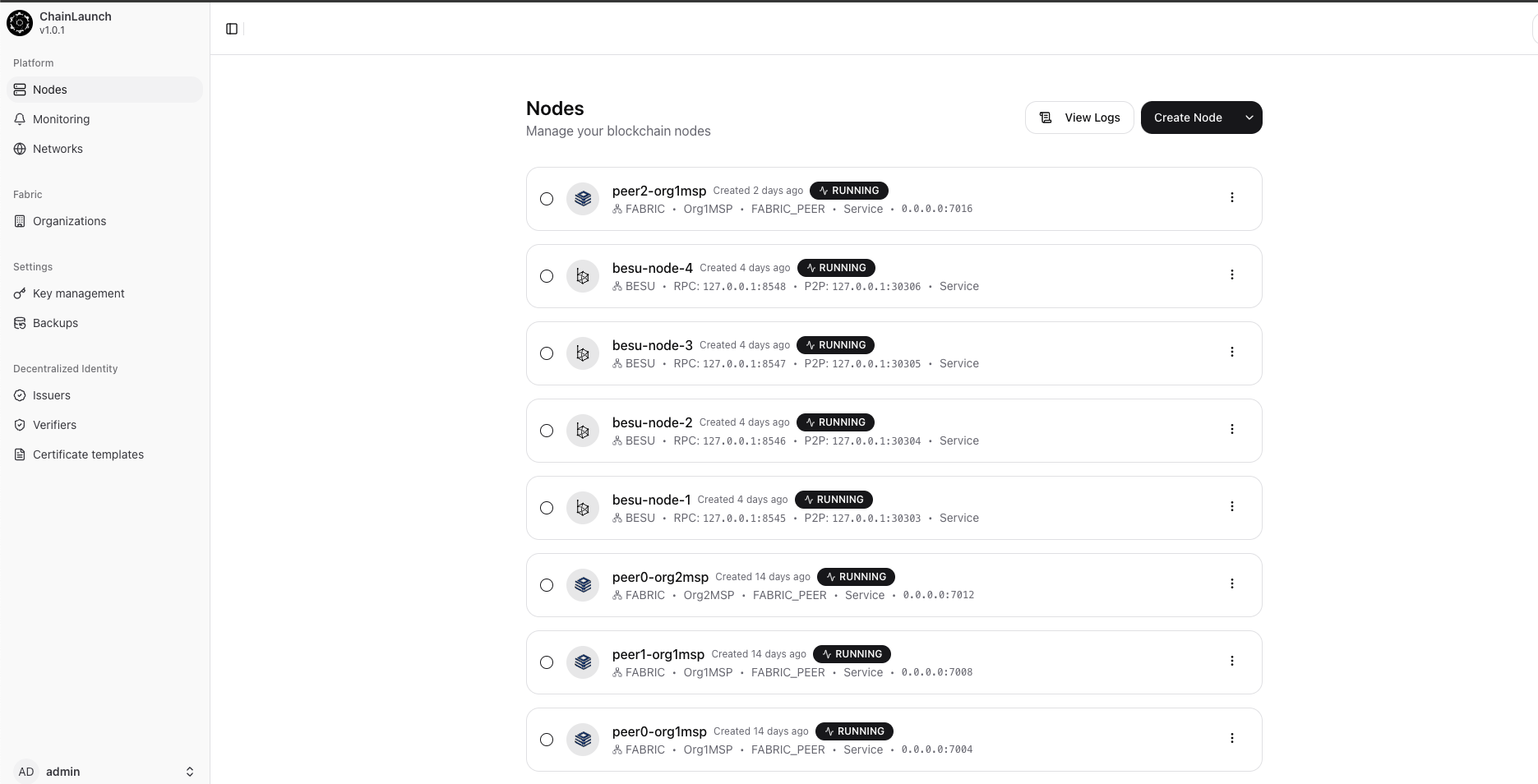
Go to http://localhost:8100 to see your nodes, deploy smart contracts with AI, and monitor your network.
System Requirements
| Minimum | Recommended | |
|---|---|---|
| CPU | 2 cores | 4+ cores |
| RAM | 4 GB | 8 GB+ |
| Disk | 10 GB | 20 GB+ |
| OS | macOS 10.15+ / Ubuntu 22.04+ | Ubuntu 24.04 LTS |
| Docker | 20.10+ | Latest |
Manual Installation
If you prefer not to use the install script, download the binary directly:
macOS (Apple Silicon)
export CHAINLAUNCH_VERSION=$(curl -s https://api.github.com/repos/LF-Decentralized-Trust-labs/chaindeploy/releases/latest | grep tag_name | cut -d '"' -f 4)
curl -L -O "https://github.com/LF-Decentralized-Trust-labs/chaindeploy/releases/download/${CHAINLAUNCH_VERSION}/chainlaunch-darwin-arm64"
chmod +x chainlaunch-darwin-arm64
sudo mv chainlaunch-darwin-arm64 /usr/local/bin/chainlaunch
macOS (Intel)
export CHAINLAUNCH_VERSION=$(curl -s https://api.github.com/repos/LF-Decentralized-Trust-labs/chaindeploy/releases/latest | grep tag_name | cut -d '"' -f 4)
curl -L -O "https://github.com/LF-Decentralized-Trust-labs/chaindeploy/releases/download/${CHAINLAUNCH_VERSION}/chainlaunch-darwin-amd64"
chmod +x chainlaunch-darwin-amd64
sudo mv chainlaunch-darwin-amd64 /usr/local/bin/chainlaunch
Linux (amd64)
export CHAINLAUNCH_VERSION=$(curl -s https://api.github.com/repos/LF-Decentralized-Trust-labs/chaindeploy/releases/latest | grep tag_name | cut -d '"' -f 4)
curl -L -O "https://github.com/LF-Decentralized-Trust-labs/chaindeploy/releases/download/${CHAINLAUNCH_VERSION}/chainlaunch-linux-amd64"
chmod +x chainlaunch-linux-amd64
sudo mv chainlaunch-linux-amd64 /usr/local/bin/chainlaunch
Linux (arm64)
export CHAINLAUNCH_VERSION=$(curl -s https://api.github.com/repos/LF-Decentralized-Trust-labs/chaindeploy/releases/latest | grep tag_name | cut -d '"' -f 4)
curl -L -O "https://github.com/LF-Decentralized-Trust-labs/chaindeploy/releases/download/${CHAINLAUNCH_VERSION}/chainlaunch-linux-arm64"
chmod +x chainlaunch-linux-arm64
sudo mv chainlaunch-linux-arm64 /usr/local/bin/chainlaunch
First-time start
The server requires you to set initial admin credentials on first run — there is no default password. If CHAINLAUNCH_USER and CHAINLAUNCH_PASSWORD are unset and the database has no users, startup aborts:
No users found in database. CHAINLAUNCH_USER and CHAINLAUNCH_PASSWORD environment variables must be set for initial user creation
Set them once, then start the server:
export CHAINLAUNCH_USER=admin
export CHAINLAUNCH_PASSWORD='change-me-to-something-strong'
chainlaunch serve --port=8100 --db=./chainlaunch.db
On subsequent starts the env vars are no longer required (the user lives in the SQLite DB). If you set CHAINLAUNCH_PASSWORD later, the server resets that user's password and promotes them to admin — useful for password recovery.
Configuration (Optional)
# Override admin credentials at startup (see "First-time start" above)
export CHAINLAUNCH_USER=admin
export CHAINLAUNCH_PASSWORD='change-me-to-something-strong'

# Fabric-X local-dev mode (macOS / Windows Docker Desktop)
# Rewrites container-to-host addresses to host.docker.internal so committers
# can dial orderers across the Docker bridge.
export CHAINLAUNCH_FABRICX_LOCAL_DEV=true

# AI Integration
export ANTHROPIC_API_KEY=sk-ant-...    # For Claude AI chaincode assistant
export OPENAI_API_KEY=sk-...           # For OpenAI integration
Run as a System Service
The deploy.sh installer registers ChainLaunch with systemd (Linux) or launchd (macOS) automatically and writes CHAINLAUNCH_USER / CHAINLAUNCH_PASSWORD into the unit file. If you installed manually, write your own service file pointing at /usr/local/bin/chainlaunch serve --port=8100 --db=/var/lib/chainlaunch/chainlaunch.db and inject the same env vars. A minimal systemd example:
# /etc/systemd/system/chainlaunch.service
[Unit]
Description=ChainLaunch
After=network.target docker.service
Requires=docker.service

[Service]
User=root
Environment=CHAINLAUNCH_USER=admin
Environment=CHAINLAUNCH_PASSWORD=change-me
ExecStart=/usr/local/bin/chainlaunch serve --port=8100 --db=/var/lib/chainlaunch/chainlaunch.db
Restart=on-failure

[Install]
WantedBy=multi-user.target
sudo systemctl daemon-reload
sudo systemctl enable --now chainlaunch
Pro tip — ChainLaunch Pro ships a
chainlaunch installsubcommand that generates this file for you. The open-source build does not.